 BanyanDB
Web Console (Canopy)
Canopy is the official web console of BanyanDB. It is a standalone web application — a React single-page app served by a Node.js BFF — that connects to the BanyanDB HTTP API (the gRPC-gateway on port 17913) and lets you browse schemas, query measures, streams, traces and properties from a browser.
Canopy ships as a separate Docker image, apache/skywalking-banyandb:<version>-canopy, and runs as its own process alongside a BanyanDB server. BanyanDB itself exposes only the client API under /api on port 17913. Canopy is also published as a tarball, skywalking-banyandb-<version>-canopy.tgz — see Get Binaries for the download location and the unpack-and-run steps.
Run with Docker
Canopy needs a BanyanDB server it can reach, a session secret and a users file. Create a users.yaml listing the console users (see Generating a password hash):
- username: admin
  passwordHash: <bcrypt hash>
  role: admin    # admin (read-write) | readonly
BANYANDB_TARGET must be reachable from inside the Canopy container. When BanyanDB runs in another container, put both on the same Docker network and point at its container name (a bare localhost would refer to the Canopy container itself):
docker network create banyandb-net
docker network connect banyandb-net banyandb   # your BanyanDB container

docker run -d \
  --network banyandb-net \
  -p 4000:4000 \
  -e BANYANDB_TARGET=http://banyandb:17913 \
  -e SESSION_SECRET=<random secret of at least 32 characters> \
  -e CANOPY_USERS=/etc/canopy/users.yaml \
  -v $(pwd)/users.yaml:/etc/canopy/users.yaml:ro \
  --name canopy \
  apache/skywalking-banyandb:<version>-canopy
Replace <version> with the release you run, for example 0.11.1-canopy.
Open http://localhost:4000 and log in with one of the users defined in the file.
If the BanyanDB server enforces Basic-Auth on its HTTP API, configure the upstream credential so Canopy attaches it to every proxied API request:
-e BANYANDB_UPSTREAM_USERNAME=<username> \
-e BANYANDB_UPSTREAM_PASSWORD=<password>
Generating a password hash
passwordHash is an argon2id hash (a standard $argon2id$v=19$m=…,t=…,p=…$salt$hash string, portable with SkyWalking Horizon UI) of the user’s password, not the password itself. Existing bcrypt hashes ($2a$/$2b$/$2y$) still verify, with a startup warning asking you to rehash. Generate an argon2id hash with the Canopy image — the trailing -e is Node’s eval flag, since the image entrypoint is node:
docker run --rm apache/skywalking-banyandb:<version>-canopy \
  -e "require('hash-wasm').argon2id({password:'your-password',salt:require('crypto').randomBytes(16),parallelism:1,iterations:3,memorySize:19456,hashLength:32,outputType:'encoded'}).then(console.log)"
role is admin or readonly; Horizon’s viewer is accepted as readonly, and maintainer/operator as admin. Users can also be configured with CANOPY_AUTH_CONFIG (a YAML/JSON file with an auth: section: backend: local, local.users, and session.cookieName/ttlMinutes/cookieSecure), with CANOPY_AUTH_BACKEND and CANOPY_AUTH_SESSION_* overrides. CANOPY_USERS is an alias for auth.local.users. With backend: local and no users, Canopy starts and every login is refused; there is no default admin. Single sign-on (OIDC/OAuth2), API tokens and break-glass accounts are described in the Canopy authentication design and the Canopy README. Sessions are kept in server memory (a restart signs everyone out), expire after ttlMinutes (default 60) of inactivity, and a role change or user removal takes effect on the next request.
Run from source
The Canopy README covers running from a checkout in two shapes: the two-terminal dev setup (SPA dev server on 5173, BFF on 4000), and a production build where the BFF alone serves the built SPA on 4000. Its .env.example documents every setting: session secret, user file, reverse-proxy base path and metrics monitoring target.
Sampling pipelines
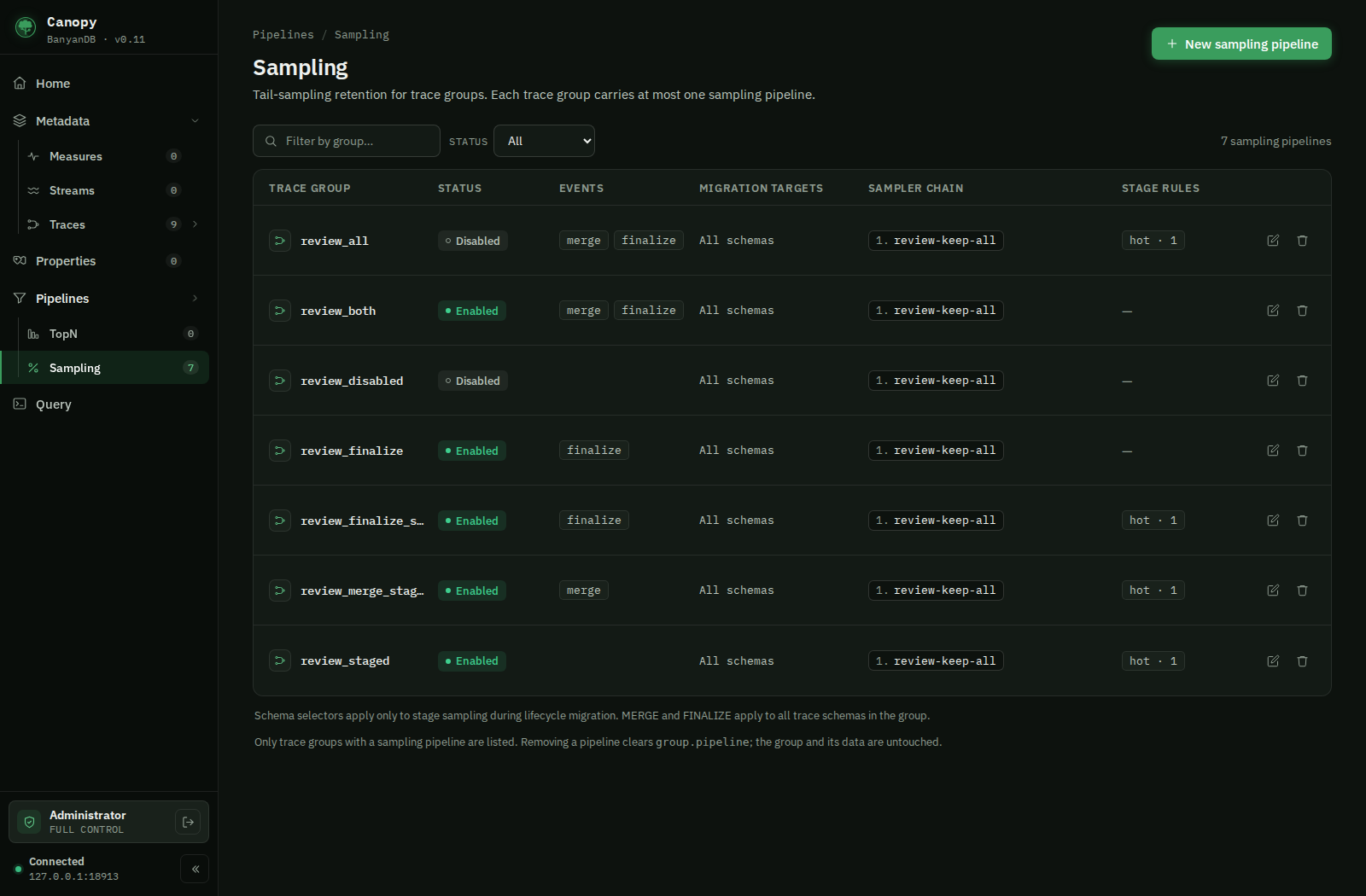
Open Pipelines → Sampling to manage the optional retention pipeline on an existing TRACE group. Each group has at most one pipeline; its identity is the group name. New sampling pipeline selects a TRACE group without a pipeline. The detail page shows its events, grace periods, ordered sampler chain, migration schema targets and lifecycle stage rules. Edit supports both Form and YAML views.
Enable MERGE for sampling during compaction and FINALIZE for sampling at
segment finalization. The configuration model allows these events and lifecycle
stage rules in any combination: MERGE only, FINALIZE only, stages only, or any
combination of them.
Both events use the ordered pipeline.plugins chain; stage rules use their own
chains. Clearing both event checkboxes saves enabledEvents: [] and leaves stage
rules active while the pipeline is enabled. With both events off, an enabled
pipeline must have a stage sampler chain. Otherwise, disable the pipeline. An
empty or omitted event list does not enable MERGE implicitly.
Existing configurations that relied on the former implicit MERGE default must
explicitly include PIPELINE_EVENT_MERGE to retain merge-time sampling. During a
rolling upgrade, older data nodes still apply that default; disabling both events
requires the updated data nodes.
For example, this pipeline configuration enables both
without installing a sampler (replace my-traces with the selected group):
group: my-traces
pipeline:
  enabled: true
  enabledEvents:
    - PIPELINE_EVENT_MERGE
    - PIPELINE_EVENT_FINALIZE
  mergeGrace: 7200s
  finalizeGrace: 300s
  plugins: []
  stages: []
  schemaNames: []
  schemaNameRegex: ''
Durations use protobuf JSON notation (seconds with an s suffix). An omitted
mergeGrace uses the engine’s two-hour default; an omitted finalizeGrace uses
five minutes. Migration targets (schemaNames and schemaNameRegex) apply
only to source-stage sampling during lifecycle migration; empty selectors target
all trace schemas in the group. MERGE and FINALIZE apply to all trace schemas
in the group regardless of these selectors.
The YAML view contains the selected group and its pipeline mapping, using
the camelCase keys shown above. Keep the group name unchanged.
Add samplers in execution order. A sampler references a .so basename already
installed in the server’s trusted plugin directory; Canopy does not upload or
build plugins. Its config is a plugin-defined JSON object. For example, a
pipeline.plugins entry may be:
plugins:
  - name: retention
    sampler:
      path: retention.so
      symbol: NewSampler
      abiVersion: 1
      config: {}
Use Stage rules to configure an ordered sampler chain for each source stage.
The lifecycle agent applies it before migrating out of that stage, independently
of MERGE and FINALIZE. Enter a configured source stage name (for example, warm
for warm → cold), or the source node’s type label for the implicit initial tier
(for example, hot for hot → warm). The terminal stage has no outgoing migration.
Install the plugin in the lifecycle agent’s trusted plugin directory and enable
its native plugin host as well as configuring the pipeline.
For stage-only sampling, leave both event checkboxes off and add a stage sampler:
group: my-traces
pipeline:
  enabled: true
  enabledEvents: []
  stages:
    - stage: hot
      plugins:
        - name: retention
          sampler:
            path: retention.so
            abiVersion: 1
Saving a sampling pipeline preserves the group’s storage settings and lifecycle stages. Editing the group’s TTL or lifecycle stages also preserves its pipeline. Remove clears only the pipeline configuration; the group and its trace schemas remain. Read-only users can inspect pipeline details.